

Payment Deadlines for Academic Year 2025-2026
| Term | Recommended Financial Aid File Completion Date | Payment Deadline | Census Date (Most Courses) | Withdraw Date (Most Courses) |
|---|---|---|---|---|
| Summer 2025 | TBD | June 4, 2025 | June 5, 2025 | July 22, 2025 |
| Fall 2025 - Early Registration (before July 15, 2025) | TBD | July 30, 2025 | September 3, 2025 | November 13, 2025 |
| Fall 2025 - Registration (July 15, 2025 or after) | TBD | August 28, 2025 | September 3, 2025 | November 13, 2025 |
| Spring 2026 | TBD | January 29, 2026 | February 4, 2026 | April 16, 2026 |
Census and Withdraw Dates
- Census Date: Last day to drop a course without being charged.
- Withdraw Date: Last day to withdraw from a course without affecting your GPA. You will still be responsible for the course tuition.
Important: Always check with Financial Aid before dropping or withdrawing from classes, as doing so may impact your eligibility and could result in owing funds back.
How To
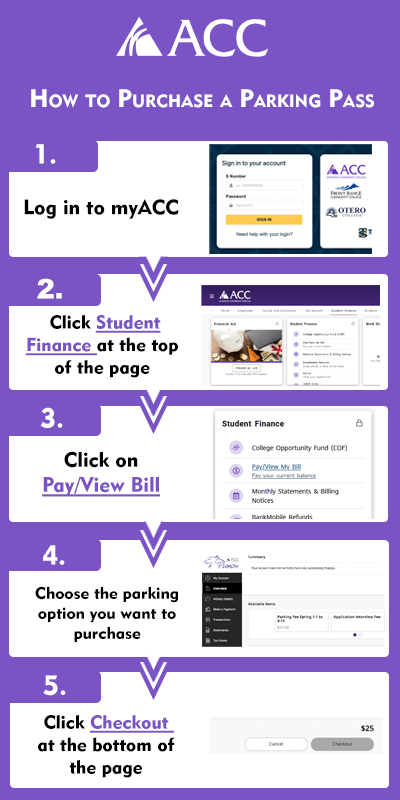
- Login to myACC
- Click on the Student Finance option at the top of the page
- Click Pay/View bill on the Student Finance card
- Click on the parking option you want to purchase
- Click on Checkout at the bottom of the page
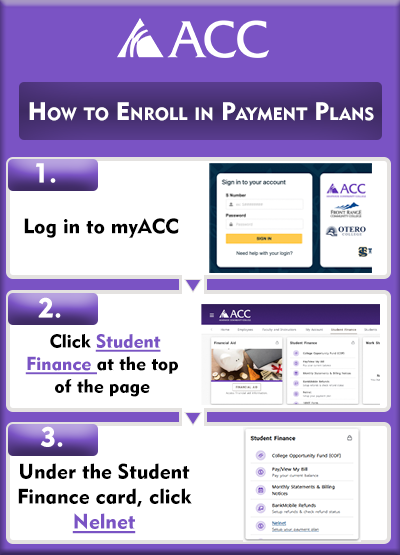
- Login to myACC
- Click on the Student Finance option at the top of the page
- Find the Student Finance card
- Click on the Nelnet link
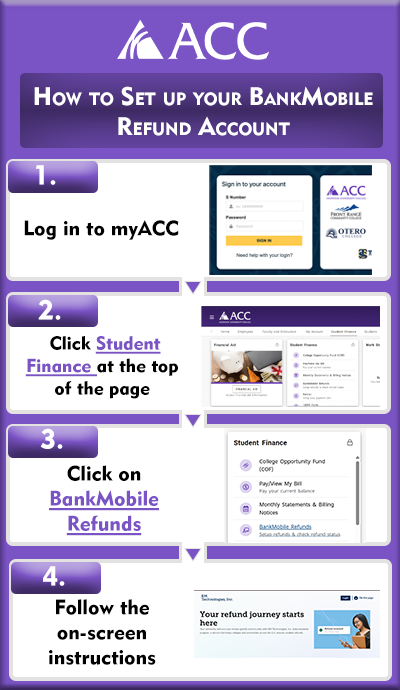
- Login to myACC
- Click on the Student Finance option at the top of the page
- Click on BankMobile Refunds
- Follow the on-screen instructions
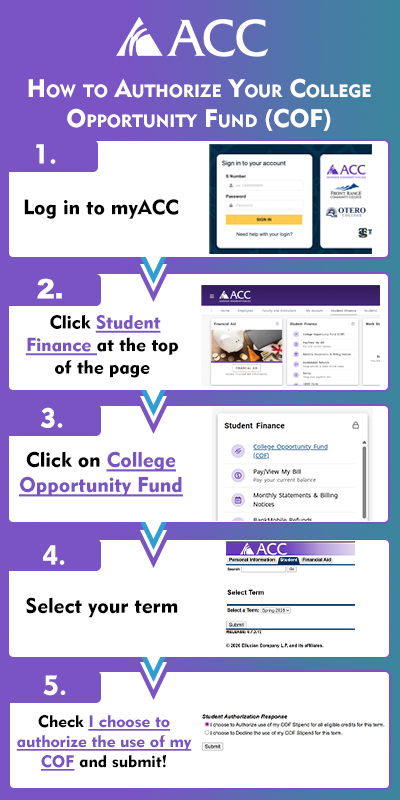
- Login to myACC
- Click on the Student Finance option at the top of the page
- Click on College Opportunity Fund
- Select your term
- Check "I choose to authorize the use of my COF" and submit