

Payment Deadlines for Academic Year 2025-2026
| Term | Recommended Financial Aid File Completion Date | Payment Deadline | Census Date (Most Courses) | Withdraw Date (Most Courses) |
|---|---|---|---|---|
| Summer 2025 | TBD | June 4, 2025 | June 5, 2025 | July 22, 2025 |
| Fall 2025 - Early Registration (before July 15, 2025) | TBD | July 30, 2025 | September 3, 2025 | November 13, 2025 |
| Fall 2025 - Registration (July 15, 2025 or after) | TBD | August 28, 2025 | September 3, 2025 | November 13, 2025 |
| Spring 2026 | TBD | January 29, 2026 | February 4, 2026 | April 16, 2026 |
Census and Withdraw Dates
- Census Date: Last day to drop a course without being charged.
- Withdraw Date: Last day to withdraw from a course without affecting your GPA. You will still be responsible for the course tuition.
Important: Always check with Financial Aid before dropping or withdrawing from classes, as doing so may impact your eligibility and could result in owing funds back.
Payment Deadlines for Academic Year 2026-2027
| Term | Payment Deadline | Census Date (Most Courses) | Withdraw Date (Most Courses) |
|---|---|---|---|
| Summer 2026 | June 4, 2026 | June 4, 2026 | July 21, 2026 |
| Fall 2026 - Early Registration (before July 15, 2026) | July 31, 2026 | September 2, 2026 | November 12, 2026 |
| Fall 2026 - Registration (July 15, 2026 or after) | September 2, 2026 | September 2, 2026 | November 12, 2026 |
| Spring 2027 | February 3, 2027 | February 3, 2027 | April 15, 2027 |
Census and Withdraw Dates
- Census Date: Last day to drop a course without being charged.
- Withdraw Date: Last day to withdraw from a course without affecting your GPA. You will still be responsible for the course tuition.
Important: Always check with Financial Aid before dropping or withdrawing from classes, as doing so may impact your eligibility and could result in owing funds back.
How To
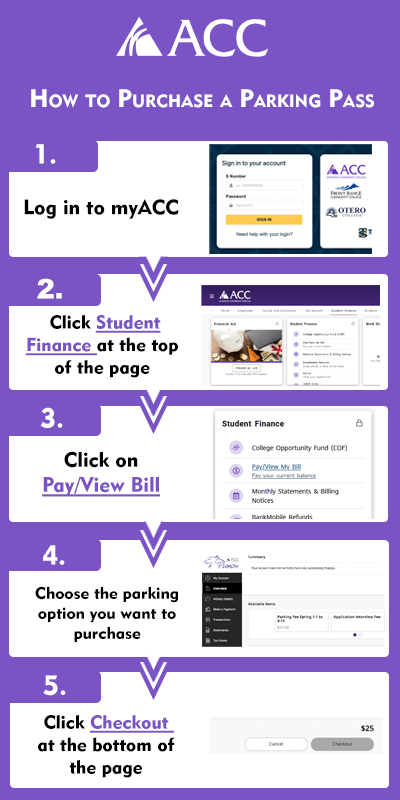
- Login to myACC
- Click on the Student Finance option at the top of the page
- Click Pay/View bill on the Student Finance card
- Click on the parking option you want to purchase
- Click on Checkout at the bottom of the page
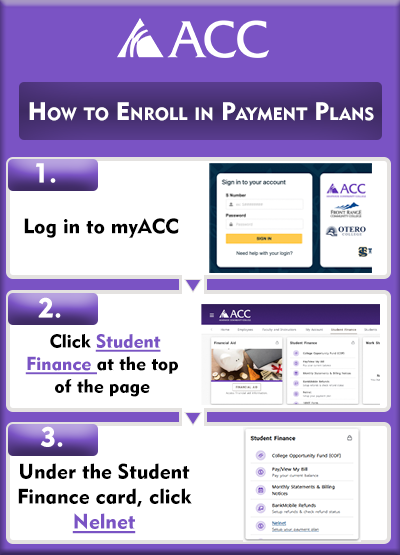
- Login to myACC
- Click on the Student Finance option at the top of the page
- Find the Student Finance card
- Click on the Nelnet link
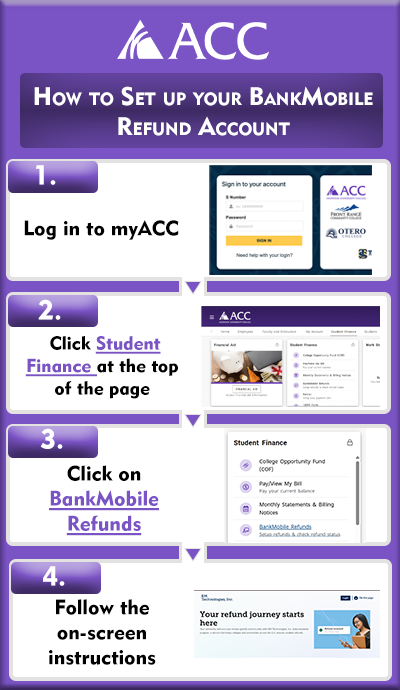
- Login to myACC
- Click on the Student Finance option at the top of the page
- Click on BankMobile Refunds
- Follow the on-screen instructions
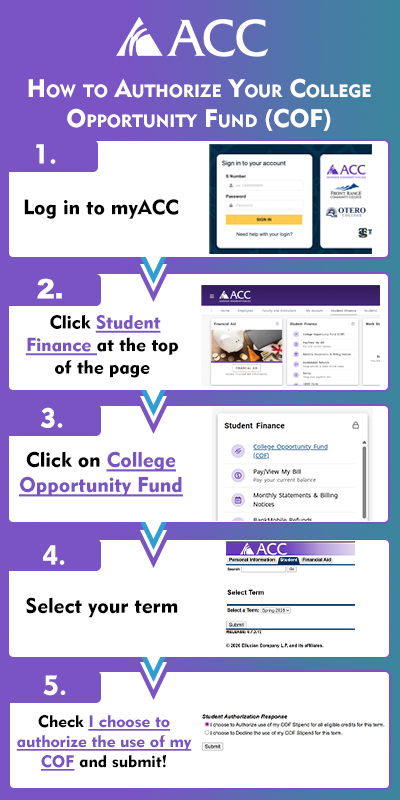
- Login to myACC
- Click on the Student Finance option at the top of the page
- Click on College Opportunity Fund
- Select your term
- Check "I choose to authorize the use of my COF" and submit